AION 2 Character Creation Guide: Factions, Classes, Presets and Sliders
Updated 6 min read
Short answer
AION 2 character creation runs in this order: faction (Elyos or Asmodian, which is also your race), server, class (eight at Global launch), appearance, then name. Launch guides report four character slots per account and no announced faction, class, server or name change service, so appearance is the only choice you can revisit later. Record your starting preset and every changed control before you confirm.
The choices, in order
- 1
Faction
Elyos or Asmodian. AION 2 has no separate race picker: your people and your faction are the same decision.
- 2
Server
Pick a server in your region. A full server can show "character creation is restricted on this server" (see below).
- 3
Class
Templar, Gladiator, Assassin, Ranger, Sorcerer, Spiritmaster, Cleric or Chanter. Launch guides list all eight for both factions.
- 4
Appearance
Start from a preset, then refine Face, Hair, Style and Body Shape. This is where presets and slider values come in.
- 5
Name
Choose carefully. No rename service had been announced for Global at launch.
What you can and cannot change later
| Choice | Change later? | Status at Global launch |
|---|---|---|
| Faction (race) | No | No faction change service announced |
| Server | No | No transfer policy announced |
| Class | No | Create another character to try a different role |
| Name | No | No rename service announced |
| Appearance | Yes | Through an appearance change; check the cost shown in your client |
Service policies change. If NCSOFT announces a transfer or change service, it will appear in the official notices linked under Sources.
The appearance editor
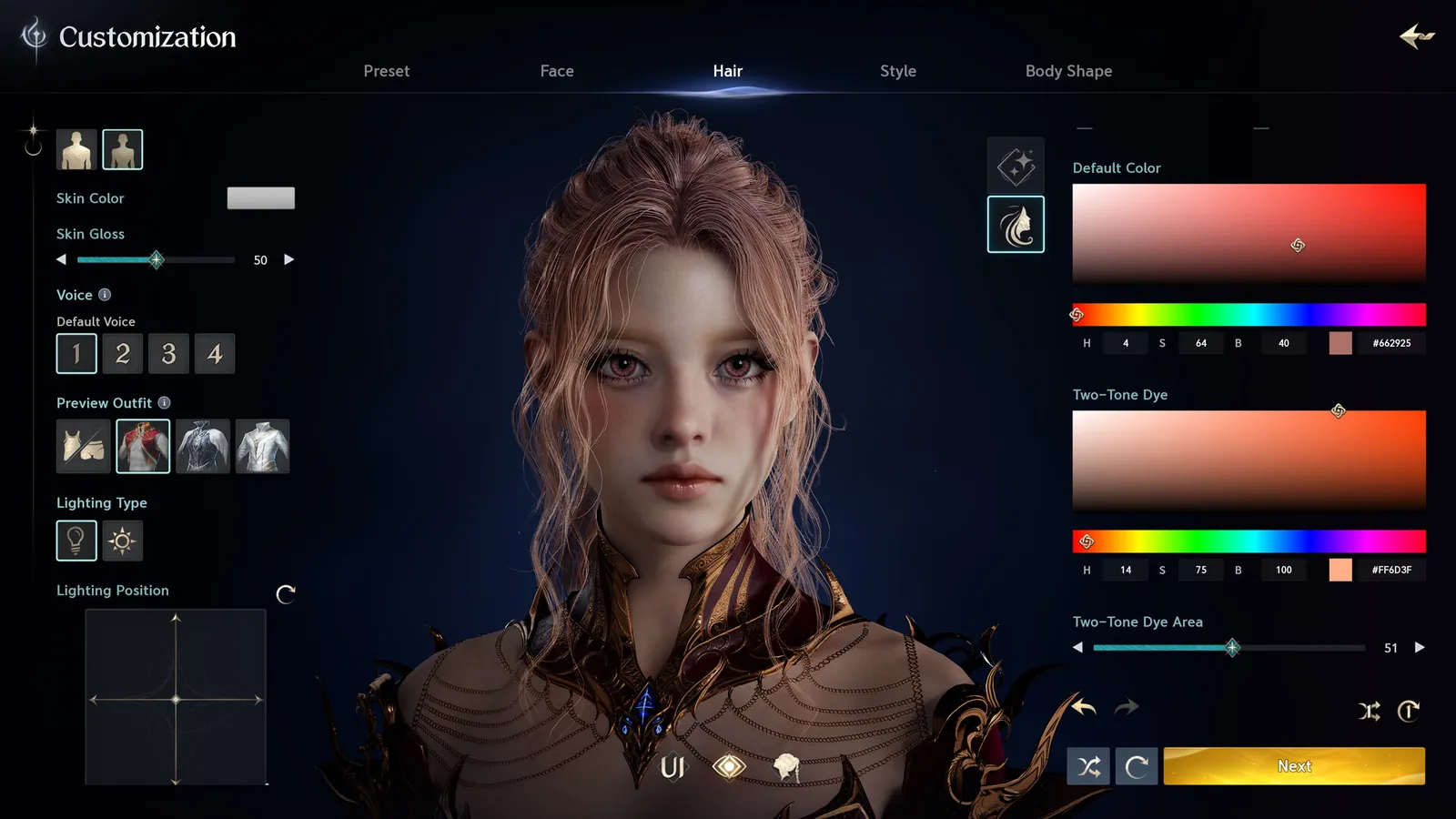
The editor runs on Unreal Engine 5 and NCSOFT advertises more than 200 customization options. Its tabs are Preset, Face, Hair, Style and Body Shape. The official screenshot also shows skin gloss, two-tone hair dye with HEX colour values, and a preview lighting control. Keep the lighting the same when you compare screenshots.
See how to record numbers, colours and options.
Recording slider valuesUsing someone else’s face
If the creator uploaded the face to the Style Shop for your service, you can load it from there. Otherwise, start from the same base preset and enter the values they shared. Compare front and three-quarter views before you confirm, since option numbering and control ranges can differ between client versions.
Browse references with creator credit and slider values.
Browse character presets"Character creation is restricted on this server"
This message means the server, or one faction on it, has reached its population cap. Creation is limited during busy periods to keep servers stable and the two factions balanced.
- Try the other faction on the same server, which may still be open.
- Pick a less crowded server in the same region.
- Check again after maintenance, when caps are often raised.
If you recorded your appearance, you can rebuild the same face on whichever server opens up.
Before confirming
- Record colour values as six-digit HEX, including leading zeroes.
- Keep option names or numbers exactly as shown. Do not replace a game option number with the position of its thumbnail.
- Note any control that is missing from our Slider Sheet. The sheet follows a draft dictionary that is still being checked against the client.
Keep a written appearance backup alongside your screenshots.
Open Slider SheetSources and original references
FAQ
Can you change your appearance after character creation in AION 2?
Yes. Appearance is the one creation choice you can revisit, through an appearance change. Check the voucher or currency cost shown in your client before confirming.
Can you change class or faction in AION 2?
No class or faction change service had been announced for Global at launch. Create another character to play a different class or faction.
How many characters can you create in AION 2?
Launch guides report four character slots per account on Global.
Why is character creation restricted on my server?
The server or your chosen faction has reached its population cap. Try the other faction, another server, or check again after maintenance.